USB Ethernet adapter or Gigabit hub: do you need 2.5GbE?
Keep working Ethernet, add one network adapter or choose a multiport hub. Check the local network, USB route and driver policy before paying for a faster label.
LLean Desk Guide editorial AI-assisted · Updated Nov 2, 2026 · Sources checked Nov 2, 2026
Keep a wired connection that already does the job. If only Ethernet is missing, a separate USB network adapter can leave your existing monitor and charger alone. A multiport hub makes more sense when several of its connections solve recurring needs together.
Choose 2.5GbE for a verified network requirement. It is a local link capability, not a promise of faster internet, better calls or a faster file copy. We have not benchmarked these products.
Product views and details
Images are credited individually below. Select a view to enlarge it.
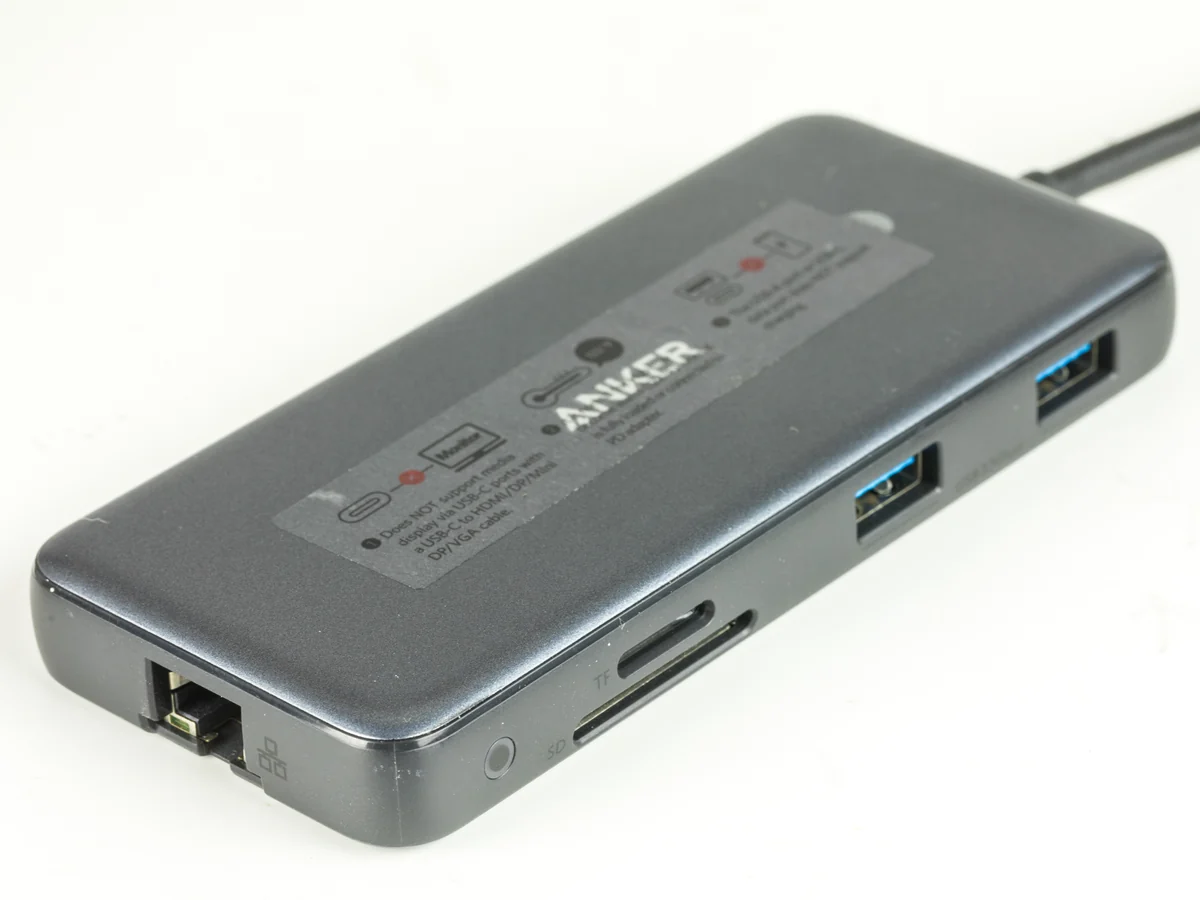
Anker 555 USB-C Hub (A8383, 8-in-1)The other side shows Ethernet, SD/microSD and USB-A connections. The photograph identifies the sockets, not measured transfer speeds or simultaneous-use performance.
Verify the exact USB data route and permitted driver.
LOCAL LINKSCable → switch → destination
A 2.5GbE adapter does not change another port’s link mode.
SEPARATE LIMITRouter → internet service
The local link number is not an internet-speed promise.
Original connection-planning diagram, not a product photograph, benchmark or tested setup.Choose the network job ↗
Separate the internet connection from the local network
For a local file transfer, inspect the computer connection, switch port, cable route and the device at the other end. A NAS or second computer also needs an appropriate network interface and sufficient storage performance. Replacing only the laptop adapter does not upgrade the other equipment.
For an internet task, the service and intervening router connections still matter. In an illustrative 300Mbps internet plan, a 2.5GbE laptop link does not turn the service into 2.5Gbps. Equally, a fast internet subscription does not establish the speed of a local NAS transfer.
Examples of what a replacement can and cannot change
Your situation
Useful next check
Purchase implication
Existing Gigabit route is sufficient
Keep the current cable and port
No replacement needed
One Gigabit switch port remains in the intended path
Check the actual negotiated links
A 2.5GbE laptop adapter alone cannot make that link 2.5GbE
Verified 2.5GbE switch and destination; suitable USB route
Confirm platform support and real workload
Investigate the separate 2.5GbE adapter
Ethernet plus display and USB accessories are missing
Write down the complete port and power plan
Compare the integrated hub; do not assume its network port is 10Gbps
Check the adapter as a different purchase from a dock
The selected Plugable USBC-E2500 is the non-PD model with one network socket and a hybrid USB-C/USB-A host connection. It does not add HDMI, laptop charging or a set of accessory ports. The E2500PD and E5000 are different products.
Use a supported USB 3.0 data route for the intended faster link. A physically fitting USB-C socket or a USB-A connector does not by itself establish that route; a USB 2.0 connection is a reduced-speed case. If you attach through a hub, include its shared upstream traffic in the plan.
Resolve software permission before ordering
Read the current platform notes for the exact computer and OS. Plugable describes Windows 10/11 driver installation through Windows Update, potentially under Optional Updates, and built-in NCM on macOS 11 and later. Employer controls, older platforms and ARM systems require their own confirmation.
Automatic installation is still a setup dependency. Keep an existing way to get online while preparing the adapter, and ask your administrator about permitted drivers when the computer is managed. Do not treat the general compatibility headline as approval for every platform.
Use the hub when its other ports earn their space
Anker 555 A8383 puts a Gigabit Ethernet socket alongside its other desk connections. Its USB data headline is up to 10Gbps; that does not make its Ethernet socket a 10GbE adapter. The display path, card-reader mode and laptop charging budget are separate checks.
Compare complete arrangements: existing screen and charger plus one network adapter, or the hub with the required charger and display cable. Do not replace a working hub just because an occasional network task has appeared.
Before buying, write down five things
Record the exact computer port and OS, the required negotiated network mode, the switch/router port and destination, the actual cable route, and the other connections that must stay usable. Plugable specifies Cat5e or better for its 2.5GbE route; cable condition and the complete installation still need checking.
After installation, verify the connection and workload before judging the purchase. A link-status number is not a measured application transfer rate. Keep the working arrangement if the real task was already satisfied.
Evidence and limits
This is a specification-based buying guide. Product descriptions come from the sources below; the fit examples and decision rules are our editorial analysis. We have not measured durability, performance, or comfort in a product test.
Read 3 primary sources and claim notes
Plugable USBC-E2500 — exact adapter, connections and platform notes ↗Manufacturer-linked US listing identifies B084L4JL9K; hybrid USB-C/USB-A 5Gbps host route, 10/100/1000/2500Mbps network modes, no power pass-through, RTL8156B and one adapter package. Platform-specific driver notes and Cat5e-or-better guidance do not establish actual throughput, Wi-Fi superiority or every OS/ARM pairing.
Anker 555 A8383 — manufacturer port arrangement ↗A8383 has integrated Ethernet, HDMI, USB data, SD/microSD and separately checked power pass-through. The 10Gbps USB label is not the Ethernet rate. Regional purchase terms and compatibility examples are not transferred to another package.
Anker A8383 current user guide ↗The linked English guide identifies the Ethernet socket at up to1Gbps; display modes depend on host signaling. Supporting PDF was previously downloaded from this official page and inspected again for the relevant port specifications. No measured network speed or simultaneous-use guarantee.
As an Amazon Associate I earn from qualifying purchases. Amazon links open a model listing or product search. Confirm the variant, seller, price and availability there. Disclosure.
Plugable USBC-E2500 (USB-C / USB-A, 2.5GbE)
One hybrid USB-C/USB-A Ethernet adapter for a verified network and host route.
Check the fit: Verify the exact OS and driver permission, USB 3.0 route and network equipment. USB 2.0 reduces speed. No HDMI, power pass-through or USB hub; select E2500, not E2500PD or E5000.
An eight-in-one hub to compare when you need Ethernet, card readers, or the documented higher display mode.
Check the fit: For 4K60 HDMI, Anker specifies a DP 1.4 host path. Its USB-C data socket does not output video. Check the exact laptop, monitor and cables.