Powered USB hub or USB-C dock: which connection is missing?
More USB accessories, an HDMI screen and laptop charging are different jobs. Compare Plugable USBC-HUB7BC with a portable multiport hub, including the power supply and complete cable plan.
LLean Desk Guide editorial AI-assisted · Updated Nov 1, 2026 · Sources checked Nov 1, 2026
Seven USB-A device ports with a separate supply and hybrid computer lead. Compare it when a 5 Gbps data hub solves the missing connection.
Skip it if: You need HDMI, a 10 Gbps data path, USB-C device sockets or laptop pass-through charging. Verify accessory power and the full supply footprint.
Choose more accessory ports when that is the actual job
If your monitor and laptop charger already work, you may only need more USB ports for accessories. A full video dock can be unnecessary. An externally powered USB data hub is a different purchase from a portable hub that combines HDMI, data and laptop pass-through charging.
Plugable USBC-HUB7BC is one named option for a fixed desk needing seven USB-A device ports and a separate hub power supply. Keep the laptop’s supported charger and video connection. Choose a portable multiport model such as Anker 555 only when its different connections solve your actual requirement.
Product views and details
Images are credited individually below. Select a view to enlarge it.
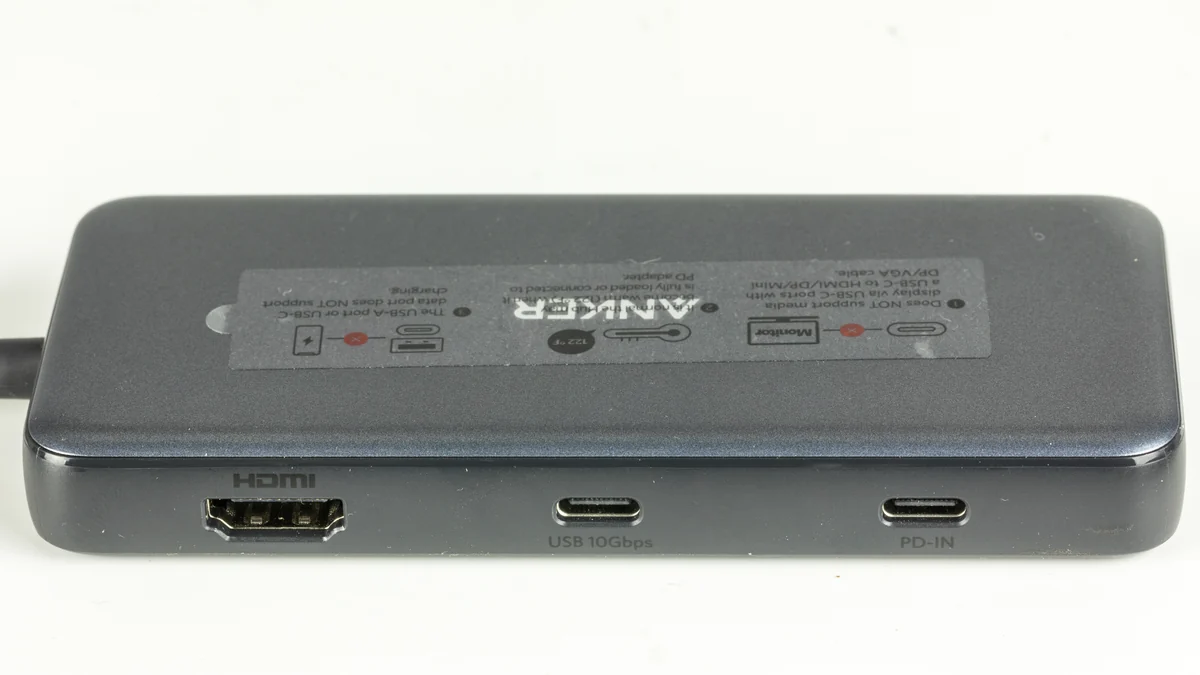
Anker 555 USB-C Hub (A8383, 8-in-1)A8383 photographed in May 2024: HDMI, USB-C data and PD-IN are separate connections. This is the PowerExpand model now sold as Anker 555; the pictured unit is not a new retail package.
The hub supply’s 60 W label is not a laptop pass-through rating.
HUB POWERWall → included supply → hub
Verify the attached devices and reserve space for the complete powered kit.
USB DATAComputer → hub → USB-A accessories
One hybrid host connection; seven USB-A device ports. Published data class: 5 Gbps.
Original planning diagram for the named data-hub route. It is not a product photograph, installation drawing or tested device combination. Existing video connections stay separate.
Match the missing connection to the device class
Start with the ports you already use, then compare the complete arrangement. None of these routes establishes compatibility with every drive, receiver, laptop or monitor.
Four different reasons to add a connection device
What is missing?
Starting route
What remains to check
Nothing: the current connections work
Keep the equipment and cables
Available ports and your ordinary setup routine
Several USB-A accessory connections
Externally powered USB data hub
Device requirements, data limit, wall supply and desk space
One HDMI path plus data/network/card ports
A suitable portable multiport hub
Exact host video mode, peripheral power and any laptop charging supply
A supported permanent multi-display arrangement
A dock chosen for the actual host/display route
Native/MST/DisplayLink limits, software, cables and charging
What the selected powered hub provides
USBC-HUB7BC has seven USB-A device ports. The USB-C option is on its included computer connection, not seven USB-C accessory sockets. Its package lists a one-metre USB-A-to-USB-B host lead with a USB-C adapter and a separate 60 W supply.
The published USB data class is 5 Gbps. If your purchase requirement is a listed 10 Gbps data path, this model is outside that requirement. More sockets do not turn its one host connection into seven independent 5 Gbps connections to the computer.
Use the full model name. USBC-HUB7BC is the selected hybrid-host model; the similarly named USB3-HUB7BC is a different product, whose current manufacturer page marks it discontinued. Do not substitute the older SKU from a similar-looking listing.
A hub power supply and a laptop charger do different jobs
The 60 W figure belongs to this hub’s external supply, listed at 12 V and 5 A. It is not a 60 W laptop pass-through promise. Plan the laptop’s normal supported charging connection separately. The selected data hub also does not add an HDMI or DisplayPort socket.
Plugable lists BC 1.2 at 5 V/1.5 A on its device ports and describes charging behavior as device dependent. Check the exact accessory’s power and charging requirements rather than treating a battery-charging label as proof that an arbitrary SSD, phone or other device receives its preferred power. Do not add standalone charging headlines into an unverified simultaneous power budget.
Compare this with Anker 555 without mixing the power routes
Anker 555 A8383 lists 10 Gbps data connections, Ethernet, card readers and one HDMI output. Its laptop pass-through route is a separate job from accessory data ports; its documented laptop-output ceiling is up to 85 W under supported conditions. For its 4K/60 Hz HDMI route, Anker’s guide specifies the required DP 1.4 host path.
The credited A8383 photograph in this guide helps identify its separate USB-C data and PD-IN sockets. It is not a photo of the Plugable powered hub. A8383’s port count and data-rate headline do not establish a universal power guarantee for every connected drive.
Reserve space for the supply and cable exits
Plugable lists the bare USBC-HUB7BC body at 12.7 × 7.62 cm in width and depth, with 2.54 cm height. That body outline is not the footprint of the complete working kit. Add the actual supply, wall lead, cable exits and whatever clearance your installation needs.
Use the desk-space planner’s optional extra-gear reservation with your measured combined area. Do not enter only the hub body and call the complete arrangement verified. The included one-metre host lead also constrains where the laptop and hub can sit; avoid buying an unverified extension to solve a placement problem.
Do not diagnose an unreliable drive from a watt label
If a drive disconnects, first investigate the exact drive, cable and supported direct connection. A powered hub is a candidate when it addresses a documented connection or power need, not a guaranteed cure for every dropout. Our portable-SSD guide separates data rate, cable and power checks.
A supported data arrangement can still require attention to receiver position: Plugable warns that nearby USB 3 devices can affect 2.4 GHz wireless equipment. Keep protocol/pairing, the data path and radio placement separate. We have not tested drive stability or wireless performance with these combinations.
Make the complete basket before ordering
Keep working peripherals, the laptop charger and the current video cable when they already meet the task. For the selected powered hub, confirm the exact USBC-HUB7BC package, region-appropriate power lead, included supply and hybrid host connection. Your USB-C-only accessories may need their own supported USB-A data leads; the hub does not supply seven USB-C device ports.
Choose this route for a specific shortage of accessory connections. Choose a different documented arrangement when you need laptop charging, native display outputs or a higher data class. Compare the current retailer total only after that complete plan is clear.
Evidence and limits
This is a specification-based buying guide. Product descriptions come from the sources below; the fit examples and decision rules are our editorial analysis. We have not measured durability, performance, or comfort in a product test.
Plugable USBC-HUB7BC product, port tables and package ↗Exact current hybrid USB-A/USB-C host model, seven USB-A device ports, 5 Gbps class, BC 1.2/device-dependent charging, 12 V/5 A supply, included one-metre host lead, bare body dimensions and 2.4 GHz placement warning. These are published specifications, not our tests.
Plugable USB3-HUB7BC lifecycle page ↗Marks the differently named USB3-HUB7BC discontinued; prevents silently substituting that older SKU for USBC-HUB7BC.
Anker 555 A8383 specification and port notes ↗Contrasting multiport route: 10 Gbps data, HDMI, Ethernet/card readers, separate PD input/laptop output and accessory-port charging limitations.
Anker 555 user guide ↗Previously verified exact A8383 manual distinguishes DP 1.2/DP 1.4 host requirements for the stated 4K HDMI modes. Not a claim that every DP 1.2 connection has the same limit.
As an Amazon Associate I earn from qualifying purchases. Amazon links open a model listing or product search. Confirm the variant, seller, price and availability there. Disclosure.
Plugable USBC-HUB7BC (seven USB-A device ports)
An externally powered USB data hub with a hybrid USB-A/USB-C computer lead. Keep existing video and laptop charging connections.
Check the fit: USB-C is a host option, not seven USB-C device sockets. Keep the laptop charger. Verify device power, the 5 Gbps limit and the supply footprint.
An eight-in-one hub to compare when you need Ethernet, card readers, or the documented higher display mode.
Check the fit: For 4K60 HDMI, Anker specifies a DP 1.4 host path. Its USB-C data socket does not output video. Check the exact laptop, monitor and cables.